...
Showing posts with label web. Show all posts

Tuesday, 18 August 2015

How to make your Blog SEO Friendly?


It is obvious that everyone is familiar with blogs and Blogger is a product of Google Inc. and how popular the CMS (Content Management System) is among the Bloggers. There is a myth among Bloggers that Blogger blog is SEO friendly as it is owned by Google itself. But, the fact is that no CMS is SEO friendly by default. As a user we should optimize it for search engines. Google has added some useful SEO features to the Blogger platform and those include - Custom Robots.txt, Search Description for all Blogger Posts, an option to 301 redirect blogger posts, custom permalinks, custom 404 page and much more. I assume that you're familiar with these features but if you're not then Google it. I'm not explaining these features because this post is only regarding the steps which will make your blog SEO friendly. Your blog must be SEO friendly because now a days there are thousands of website and your blog will not be in the search engine or it'll be in the last pages. People usually browse and see only first 3 to 5 pages of the search. Here are few steps which will help you to make your blog SEO friendly.


Title Tag Optimization

If you’re using any default blogger templates, you might’ve noticed that your homepage title appears after every post title in search results. Since Google displays only the first 66 characters of your title, your actual title that come after your home page title will get ignored most of the time. If you’ve targeted any important keywords in your post title, then they’ll be chopped off because of the home page title being appended before it.
In order to optimize your Title tags, follow the below steps.
  1. Blogger > Template > Edit HTML
  2. Search for the below code in the <head> section of your template
    <title><data:blog.pageTitle/></title>
  3. Replace it with the below code
    <b:if cond=’data:blog.pageType == &quot;item&quot;’>
    <title><data:blog.pageName/> | <data:blog.title/></title>
    <b:else/>
    <title><data:blog.pageTitle/></title>
    </b:if>
  4. Now, save your template.

Change your Post title Heading Tag

By default, all blogger templates use H1 for homepage title, H2 for blog description and H3 to post titles. Due to the fact that the post titles are the second most important part of your blog after the main title, you should assign them an H2 instead of H3.
  1. Go to Template | Edit HTML
  2. Search for .post h3 and replace all the occurrences of it with .post h2.
  3. Next search for,
    <h3><data:title/></h3>
  4. Replace it with the below code
    <h2><data:title/></h2>
  5. Save template.


Meta Description

Blogger has implemented another much-awaited feature called ‘Search Description’. This allows us to provide a meta description to every post individually. If you’re using the default template provided by Blogger, you can simply activate this feature by going to Settings > Search Preferences and provide the description for your homepage under ‘Meta Tags’ section. Doing so will enable ‘Search Description’ option for all individual posts & you can see it on the right sidebar while you are on the post editor.
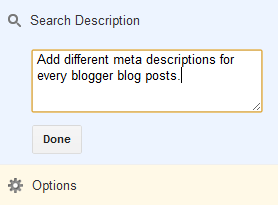
Enable Search Description Feature in Blogger
In case you’re using a custom or third-party templates, along with the above settings, you’ll also need to add a small piece of code in your template.
Add the below code under the <head> tag in your template.
<b:if cond=’data:blog.metaDescription != &quot;&quot;’>
<meta expr:content=’data:blog.metaDescription’ name=’description’/>
</b:if>

Robots.txt Settings for Blogger

The robots.txt file in Blogger will have the default settings which are not sufficient enough to control the search engines actions. By default, all your posts and labels will get indexed by the search engines like Google & Bing, thus creating a lot of duplicate content issues inside your own blog. In order to avoid such technical issues, it’s wise to make a better use of the robots.txt file.
Settings > Search Preference > Enable ‘Custom robots.txt’ under ‘Crawlers and indexing’ section and use the below text.
User-agent: Mediapartners-Google
Disallow:
User-agent: *
Disallow: /search/
Disallow: /search?
Disallow: /search?q=*
Disallow: /*?updated-max=*
Disallow: /p/about.html
Disallow: /p/privacy.html
Allow: /
Sitemap: http://www.9to5blogger.com/atom.xml?redirect=false&start-index=1&max-results=500

Points to Remember

  • Replace my domain name with yours in the sitemap section.
  • If you’ve more than 500 posts, then simply use this tool to generate the Sitemaps based on your post count.
  • You can also chose to disallow your privacy and about pages from being indexed. Make sure you change the my URLs with your own permalinks before saving.

Add NoFollow Tag to All Labels

Although you’ve disallowed indexing of Labels using the robots.txt file, it is better to add a nofollow tag to them so that there will be no chance for them to get indexed. Go to Template > Edit HTML and search for the below code.
<a expr:href=’data:label.url’ rel=’tag’>
Either add the nofollow tag to the end of the above syntax or simply replace it with the below one.
<a expr:href=’data:label.url’ rel=’tag,nofollow’>
Save your template.

Custom Robots Header Tags

These robots tags will go in the header section of your blog. You can use these settings to disable indexing of archive and search pages in search results. Go to Settings > Search Preferences > ‘Enable custom robots header tags?’ under the ‘Crawlers and indexing’ section. Next, use the below settings.
Custom X-Robots Heder Tags for Blogger
In case you don’t understand the meaning and use of these commands, then know about them here.

Submit Blogger Sitemap to Google & Bing

Although Google & Bing can find your blog, they cannot index your entire site as they won’t have a clue what pages are listed on your blog. This is why the Sitemaps existed. Generate sitemap for your blogger blog (use this tool) and then submit them to both Google Webmaster Tools & Bing Webmasters. Doing so will not only helps the search engines to crawl your blog efficiently but also let you to monitor your SEO score using their dashboard.
Note: You’ll need to place their tag on your site under <head> tag in order to verify your ownership.

Optimize URL Parameters in Webmaster Tools

URL parameters help the search engines to crawl your site even more efficiently. Prioritize your  most useful content by controlling the URL parameters that effect your site content. Simply, go to WMT > Configuration > URL parameters and the add the below parameters one by one. Watch the screenshot in case of any doubts.
  • utm_source > No > Let Googlebot decide
  • utm_medium > No > Let Googlebot decide
  • utm_campaign > No > Let Googlebot decide
  • updated-max > Yes > Sorts > Let Googlebot decide
  • showComment > No > Let Google bot decide
  • max-results > Yes > Sorts > Let Google bot decide
  • m > Yes > Paginates > Let Google bot decide
  • commentPage > Yes > Paginates > Every URL
Adding URL Parameters for Blogger in Webmaster Tools

Redirect Broken Links

Just go to your webmaster tools account and from Health > Crawl Errors, find out if there are any 404 errors on your blog. If there are any such errors, simply use a 301 to redirect them to the correct locations on your blog.


Redirect Broken Links


Go to Settings > Errors and redirections > Custom Redirects.
Apart from these basic settings, make sure you’re optimizing your blog post too. Here are some tips from my end.

How to Write a Keyword Efficient Blog Post?

  1. Analyze first & choose a target keyword before writing any article.
  2. Use the exact keyword at least twice in the article & use the synonyms (3 to 5 times) across the entire article.
  3. Ensure that the permalink of your post contains the exact keyword.
  4. The title should contain your exact match keyword.
  5. Make sure your ‘Search Description’ contains at least 1 exact keyword & 1 synonym.
  6. Lastly, give some useful insights in the article and then publish it.
My Advice: Never stuff more than the described keyword count as it looks like stuffing keywords in your article. Just use them at appropriate places (wherever suitable).

That’s all  from me! Do follow these tips to make your Blogger blog SEO friendly. Don't forget to share it on social media for the help of other bloggers. :) 

Sunday, 1 February 2015

Internet - A Most Common and Useful Approach

In this modern century the Internet is the most widespread approach to find out information, although some believe that such approach has more drawbacks. These days many people have a Personal Computer (PC) in their house, obviously they pass a lot of time using the internet. As today it is the best easy and contented way to acquire information. To begin with students, for example, when studying at school the teachers give homework, and frequently that to carry out the task they have to obtain a lot of material. So the student can't do it without internet's assistance. As for majority it's very useful and fast solution. Additionally, for normal person, internet the best mechanism to know about some news about what’s happening over the world or maybe weather forecast in his state. One should, nevertheless, not overlook that this approach of finding material has some disadvantages. Primarily, there is a risk that it’s reliable information or not. Furthermore, you simply can't find the exact information which you are looking for. You must settle with that to discover information on the Internet takes a little time and the search method also matters. There is a large number of data available for users because the whole world has to get news and knowledge whatever they need. These days the internet users are not of the specific age group. Everyone is familiar with it i.e. young and older age group too.


The internet is a boundless place and it’s the one that we could not live without now a days. But we must remember that everything may not be like that as it seems. Populace who use the internet may not be who they say they are and info you find on the internet may not be correct.
Lots of people love gaining access to the internet, but its valuable remembering to keep safe while using the internet because it’s a cyberspace. You might know the consequences along with the advantages about the internet but it’s worth facing a few things in mind.
Many of us now enjoy access to the website via a computer at home, work, and school or even on your mobile phone. It’s significant to think about what kind of info you give out, and keep to yourself in what you say and do. While using the internet you must remember the following things to avoid any sad incident.
  • Never give any personal info such as your home address, phone number, or school to anyone for online conversation, even if you are offered free samples, assistance or data.
  • If you have your personal website or pages on social media sites such as Facebook, Twitter or Google Plus, remember that these are public sites and anybody can visit them.
  • Always think cautiously about what you put on your website, particularly photos. Instead of uploading a picture of yourself you could draw an image, or upload something a bit abstract to protect your identity. But these days the social media sites try to protect your personal info.
  • Remember that people who contact you may not be who they say they are. Anybody can say that they share your interests and are the age fellow but not everybody is as they seem on the internet.
  • Never organize a face-to-face meeting on your own with anyone you’ve met on the internet. If they want to see you, tell your parents/guardians and friends. If you still choose to go forward and meet up, select a busy public place and take somebody with you.
  • Don’t answer to threatening or offensive messages and mails. No matter how frustrating or impolite they are - tell your parents/guardians, block the individual and report them to the website owner.p
  • Be cautious if you get an email from somebody you don’t know. It could have a virus at the very least, which can disorder your computer.

Friday, 30 January 2015

What is Search Engine Optimization (SEO)?


What is Search Engine Optimization (SEO)?

SEO stands for Search Engine Optimization. SEO helps to improve and promote a website to increase the traffic or you can say number of visitors that the site gets from search engines like Google. There are many aspects to SEO, from the words on your web page to the way as other sites link to you on the web. SEO is simply a way to make sure that your site is structured like the way that search engines can easily understand.
SEO is not just about making search engine friendly websites. It's about making a website better for people too. Computer Science Prevails make sure that you can fully learn about SEO and then implement it on your website. This tutorial is designed to introduce you to all the areas of SEO.

Why SEO?


The majority of web traffic sources are the major search engines like, Google, Bing, and Yahoo!. On the other hand, the social media and some other types of traffic can add up the audience to your website but the search engines are the primary key of searching for most of the Internet users. This is a fact whether your website provides content, articles, services, products, information, entertainment or anything else.
Search engines plays a vital role and are unique because they provide targeted traffic. The people who are looking for something relevant to their needs, the Search engines are the most likely source for their help. If search engine cannot track your website, or cannot add your website's content to their databases, you miss out one of the best opportunities to increase traffic to your website.
The words that internet users type into the search box has an extraordinary value and that are called search queries. Facts and figures have shown that search engine traffic matters a lot in an organization's success. Targeted traffic to a website provides publicity, revenue, and exposure like no other way of marketing. Investment in SEO will give you an excellent rate of return as compared to other types of marketing and promotion.

What happens without SEO?

Search engines are kept updated and are smart too but they still need help to search webpages for users. The search engines are always trying to improve their technology to crawl the webpages more deeply, precisely and return better search results to the users. However, there is a boundary to how search engines can operate but the SEO can let you thousands of visitors and more attention with interest. The wrong step in SEO can hide your website deep in the search results where the users does not visit. Normally the users search their relevant data and go to the first 3 to 5 pages of the search result.
Moreover, to make your website's content available to search engines, SEO also helps to boost up the rankings of your website so that the content will be available where the users will  find it more easily i.e. on the first 2,3 pages of the search engine. The world of Internet is becoming more competitive, and those developers who perform SEO in the websites will have an advantage in increasing the company's audience and customers.

Can You Perform SEO Yourself?

Performing SEO is complex, but most people can easily understand the basic concept. A small amount of knowledge can make a big difference because its a Chinese proverb that "A journey of a thousand miles begins with a single step". Your knowledge with a little practice can make you an expert. In the world of Computer Science practice is most important beside your knowledge. Becoming an expert depends on your commitment, passion to learn and the complexity of your website. First of all you must have a clear concept of SEO before performing it.
Computer Science Prevails also provides a tutorial on performing SEO correctly but first of all you must understand the basics. A tutorial on performing SEO is available, all you need is to click here.


Tuesday, 2 December 2014

Web Design and Development

Introduction to Web Designing and Development

In modern lives, people are exposed to a great amount of visual stimuli from the modern media and the Internet has grown to become one of the most notable main media channels. The advancement of internet technology has generally promoted the convenience of communication in our modern lives. Owing to the contributions through the efforts of numerous experts, scholars and industries as well as the spread of wide broadband internet in recent years, merely usability has become an insufficient criterion to can no longer satisfy users’ needs. Only with user-friendly and attractive content can on a website can ensure its continuous usage, make users to be willing to continue visit this website. Meeting the preferences of certain user groups is the key to increasing message transfer and communication efficiency.
Website development has come a long way since the mid-90s when the Web explosion took place. Early websites were often written by individuals and were text-only affairs; nowadays sites are frequently constructed by professional web design houses employing teams of developers as well as graphics artists, usability, accessibility, search engine and database specialists all collaborating to produce and maintain websites responsible for millions of dollars of annual revenue for their owners. Of course, not all website development and design is undertaken at this level; many design houses are manned by a few people whose duties frequently overlap. And there are millions of websites authored by individuals either for small businesses or, increasingly, as weblogs promoting the authors’ lifestyles and perspectives on life, politics, news.Internet becomes the new way to generating new leads and business opportunities. Most of users just look in to the internet through search engines to find out the best place where they can go to and have quality time.
Web design is one of the fastest growing and most industrious professions in today's market. Given that web design is a practically new field in which there are not many occupations, there are trends and ideas being added to web pages everyday by prominent webmasters around the world. Whether it is created for recreational reasons, for business purposes, or for practice, the designing of web pages is a remarkable, and in depth process.
From large enterprises, to small industries, independent owners, or someone developing their own personal site, the web has grown to be the easiest way to broadcast information and advertise. Many of today's webmasters use different approaches in web design. Of the many that are in existence, there are two formats that are universally known: HTML format, and the recently developed Microsoft Front Page. The conventional HTML (Hypertext Markup Language) format deals with what is known electronically as, tags. There are two main parts to a website, the head and the body. They are used to identify changes that are made to the website, whether it may be font color, background color, or font size, tags are used to identify them all.
Moreover, with the extensive tags in which the web designer must key, a large chance of inaccuracy presents itself. While the classic HTML style is a sophisticated way of giving the user complete control over their website, a major displeasure of HTML was that, "Many mistakes are made, and if you make one simple mistake, your whole page is incorrect. Eventually, it would become a somewhat tedious procedure of going back and forth and correcting mistakes, making it very challenging for general people who are not quite.

Twitter Delicious Facebook Digg Favorites More

 
Design by MA Technologies | Bloggerized by Computer Science Prevails